Upload the source PDF
Start from the document your team already uses. PuntSign stores the original privately and registers its document metadata and hash.
Agreement lifecycle
The workflow separates what the sender controls, what each recipient needs to do, and what PuntSign generates when the agreement completes.
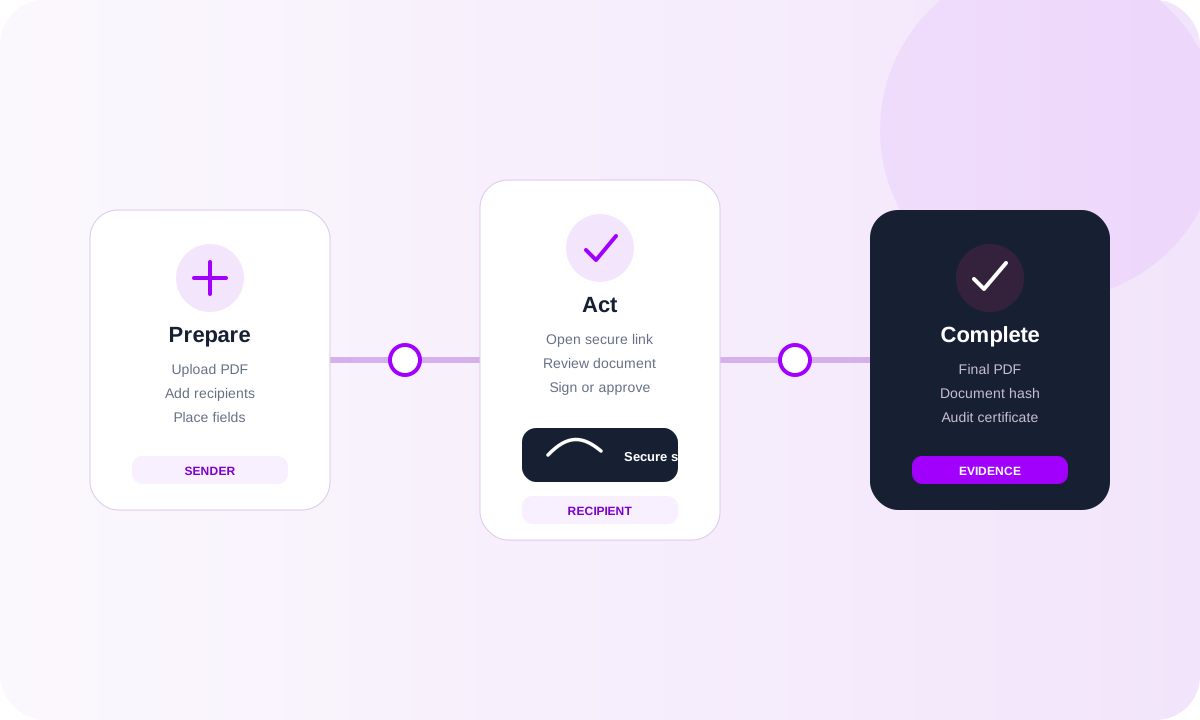
For the sender
Start from the document your team already uses. PuntSign stores the original privately and registers its document metadata and hash.
Add signers, approvers, and copy recipients with the email addresses and roles needed for the agreement.
Use parallel routing when recipients can act together, or sequential routing when later recipients must wait for an earlier order to complete.
Drag signature, initials, name, date, text, and checkbox fields onto the PDF and assign them to the relevant recipients.
Confirm the envelope setup, then send invitations to the active recipients. Scheduled reminders support agreements that remain open.
For the recipient
The recipient follows an agreement-specific email link and exchanges that access token for a time-limited signing session.
The signing page presents the PDF, organization branding, recipient role, and fields assigned to that person.
Before submitting required fields, the recipient confirms the electronic-signature consent shown in the signing flow.
A signer fills fields and signs, an approver approves or declines, and copy recipients receive the agreement without a signing task.
In sequential workflows, completion of the current order activates the next routing order until all required recipients are finished.
At completion
When all required recipients are complete, the finalization workflow loads the original PDF and submitted values, stamps the completed document, calculates its SHA-256 hash, generates a separate audit certificate, and stores both outputs privately.
Create a workspace, upload a PDF, define recipients and routing, then move the envelope through the same lifecycle described above.